Enhance documentation
Claude Code
Install Enhance from Claude Code's plugin surface, authenticate in the browser, and verify the local MCP connection.
Claude Code
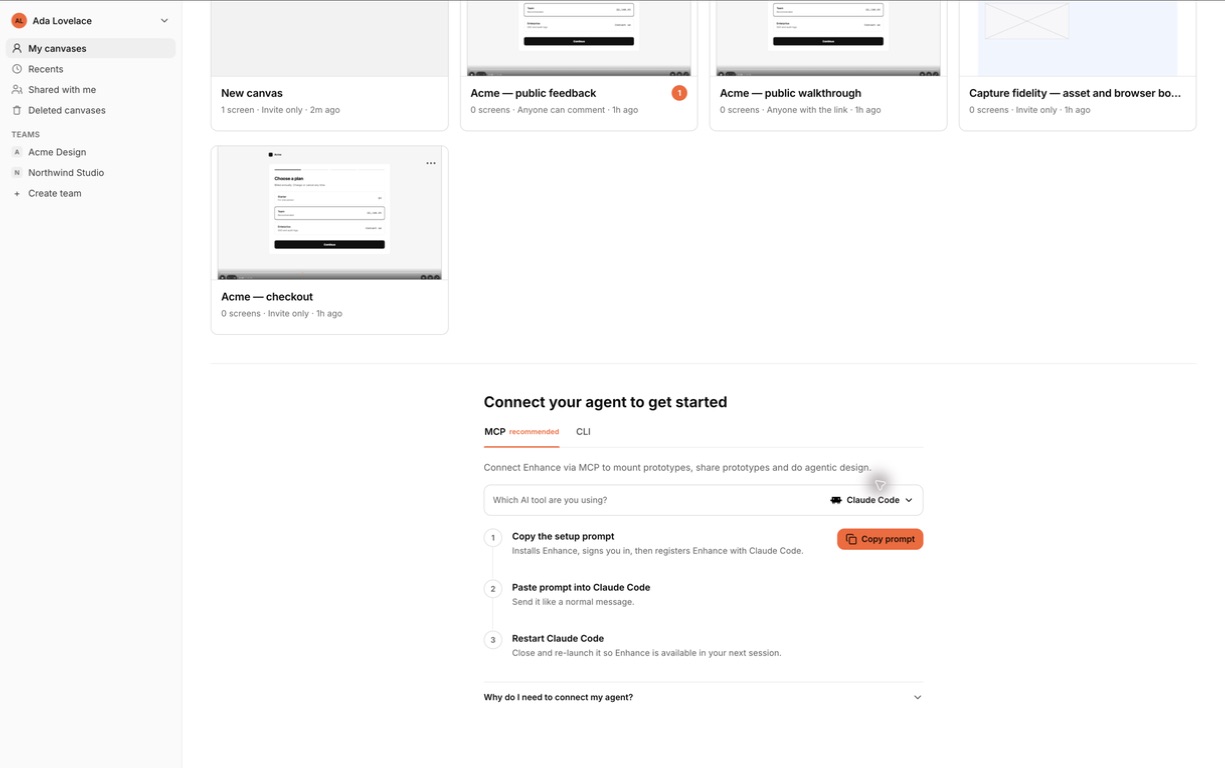
- In Enhance, select Claude Code and copy the setup prompt.
- Paste it into a normal Claude Code session. Claude opens its native Plugins view; review the source and choose User scope.
- Select Install for Enhance. If Claude says the plugin needs a reload, use its Reload plugins action.
- Ask Claude to check Enhance authentication. Complete the sign-in page that opens in your browser.
- Verify the connection with a read-only request, then ask Claude to open and render your populated example canvas.
Before official marketplace acceptance, the same prompt adds Enhance’s public catalogue and opens the native install confirmation. You do not need to edit configuration or install a command-line tool.
Updates
Third-party Claude marketplaces do not silently replace cached plugin code. Open Plugins, refresh the Enhance catalogue, and choose Update when the connection reports that the installed plugin or MCP runtime is out of date.
Recovery
If the server is unavailable, reinstall or refresh Enhance from the plugin manager. Authentication state belongs to Enhance’s local runtime, so reinstalling the cached plugin does not delete canvases or product data.