Enhance documentation
Codex
Install Enhance in Codex, complete browser sign-in, and start from a populated example canvas.
Codex
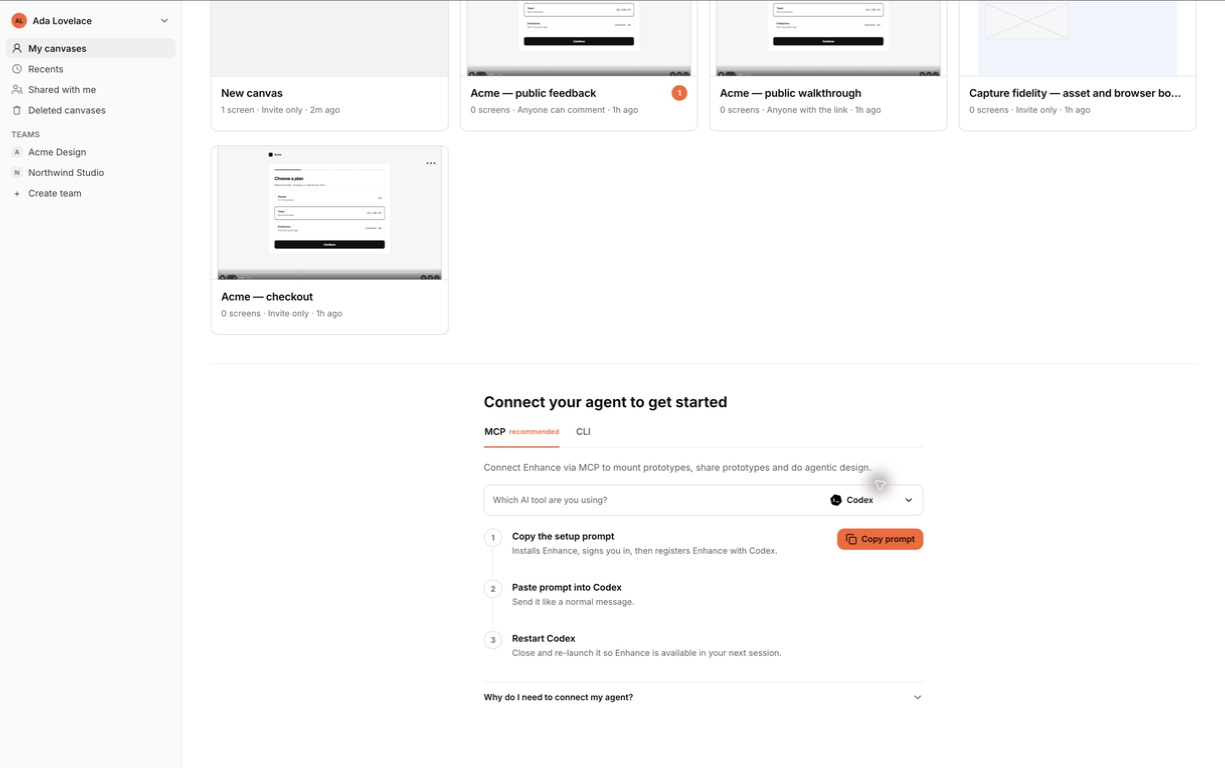
Desktop app
Enhance’s public OpenAI listing is still being prepared. You can install the complete local plugin from the Enhance catalogue in the meantime. Its bundled runtime requires Node.js 24 or later.
- In Enhance, select Codex and copy the setup prompt into the desktop app.
- Open the Plugins Directory in the ChatGPT desktop app while using Codex or Work mode.
- Choose the Enhance catalogue, select Enhance, and install it for your user account.
- Enable the plugin and let Codex start its version-pinned MCP server. Restart the app if the install surface asks you to refresh.
- Ask Codex to check Enhance status. Complete browser sign-in when it opens.
- Verify the connection with a read-only request, then ask Codex to inspect and render your example canvas.
The setup prompt identifies Enhance’s public Git catalogue. Add that catalogue before looking for Enhance in the directory.
Codex extension in VS Code or Cursor
The Codex IDE extension supports MCP servers but does not support plugins. Configure Enhance within the Codex extension:
- Open Codex’s gear menu and select MCP servers.
- Select Add server, name it
enhance, and choose Streamable HTTP. - Enter
https://api.enhance3.karunalabs.ai/mcp, save, and select Restart extension. - Select Authenticate beside Enhance and complete browser sign-in.
- Ask Codex to list your canvases and render one.
This connects remote canvas operations without installing the four local workflow skills. Local build publication and source reconciliation need the complete local plugin. The host editor’s own MCP settings configure its native agent separately.
These steps follow OpenAI’s MCP setup documentation.
Updates
Git-backed Codex plugins are cached by version and upgraded explicitly. When Enhance reports an update, open the Enhance catalogue, choose Upgrade marketplace, refresh Enhance, and re-check connection status.
Scope
User scope is the default. Use project scope only when a team intentionally wants the plugin configuration governed with that repository.